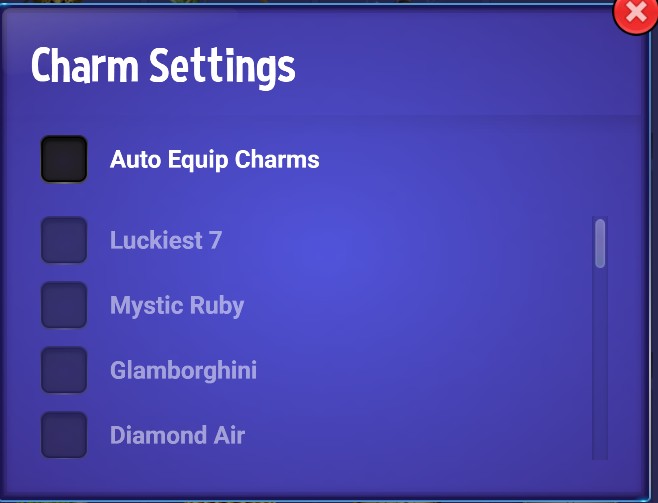
Since we’re on the topic of requesting features, I’d like to suggest a few quality-of-life improvements for the charm manager that would make a big difference for many players.
The main goal is to be able to easily load one specific type of charm into the charm buffer. This is perfect for setting up an unattended slot marathon or for distraction-free gameplay where you don’t have to constantly worry about when your charms will run out.
The current process for this is very difficult. You either have to manually load charms one at a time- imagine doing that if you have over 100,000 charms - or use the auto-equip feature, which has several issues:
- If you click “Auto-equip charms,” it checks all the charms you own. Since there is no “uncheck all” button, you then have to manually uncheck every single charm you don’t want to use.
- To make it worse, if you uncheck the auto-equip box, all the charms stay selected, and you can’t remove them until you exit the charm manager and come back in.
- If you get a new charm that you want to keep (either from a treasure box or a slot-purchase charm), it automatically gets added to the auto-equip list, forcing you to uncheck the auto-equip charms to remove that charm, then you have to start the entire tedious process over again.
A “uncheck all” button would solve the biggest part of this problem instantly and make the charm system much more user-friendly.
Thank you for considering this feedback.
4 Likes
One more feature that would be a great addition is a “Clear Charm Buffer” button.
Currently, if you have a lot of charms loaded in the buffer, there is no direct way to clear them. Players have to resort to complicated workarounds:
- You can try to remove them manually one at a time, which is quite time consuming if the buffer has hundreds of charms.
- You can refresh the entire browser which interrupts gameplay or use a trick by opening and closing the “Charm Settings.” Both of these methods do the same thing: they leave 4 charms in the buffer, which you then still have to remove manually.
A “Clear Buffer” button would be a much more intuitive solution and would let players fix mistakes easily without having to waste charms or use these multi-step tricks. Thank you!
3 Likes
I find that I “can uncheck all” of the charms by re-checking the “Auto-Equip Charms” box. Then all I need to do is remove the four charms in the Auto-Equip buffer box.
Addendum: I have since seen you next post and realize you are aware of this method.
1 Like
If I could scroll the list of charms without having the Auto Equip Charms box ticked I’d be happier with the charm setting function
1 Like
I select charms right from the main charm display. It’s a lot easier the trying to check boxes.
A function in charm selection that I’d really appreciate is to choose the number of charms to play as opposed to the game determined numbers
1 Like
My main reason for suggesting an easier way to load one charm type at a time, either through an “auto-equip” feature or another method, is to address two significant problems: the time it takes to manually load charms and the risk of devaluing your charm inventory by “averaging down.”
Manually loading thousands of charms into the buffer is incredibly time-consuming. More importantly, it can inadvertently lower the average coin balance of your charms.
Here’s an example of the “averaging down” problem: The charm buffer uses 4 active charms, while the rest are in a queue. Only the active charms provide rewards. Imagine you use 6 out of 8 Luckiest 7 charms, leaving two partially used ones in the active slots. If you then load 10 more, those two partially used charms get pushed to the end of the queue. Should you leave the game before they are used, they return to your inventory with a lower coin value, which reduces the average value of your entire stockpile of Luckiest 7 charms.
This issue is compounded by how the inventory list works. While you can manage the queue the first time you load it by seeing each charm individually, the list groups them into a single stack once you close and reopen it. At that point, you can no longer retrieve the partially used charms. Because the charm manager operates on a “First-In, Last-Out” (FILO) basis, those partially-used charms are now stuck at the back of the line. You can only use them after all the others are gone, or you must manually remove the full charms one at a time until you get to the partially used ones. You then have to use those up completely to avoid the “averaging down” effect.
An “auto-equip for one charm type” feature would solve all of these issues. Unlike manual loading, auto-equip does not use a queue; it loads charms directly into the 4 active slots. This would save a lot of time and completely prevent the “averaging down” problem by ensuring that partially used charms are always finished before new ones are added to the buffer.
I’m not sure I understand what you are saying. When I select charms, I select them right after entering the charm inventory display by clicking on the icons. Sometimes the charms I want are at the bottom of the list so I have to scroll down the display to select them. If I accidentally select charm I don’t want to use at that time, I just deselect it in the buffer. It goes to the bottom of the inventory display but then returns to its original position at a later time. (I believe that happens after I have exited the game.)
If I don’t want the charm manager to auto-fill the buffer, I go to the ‘Auto Equip’ check box and check it on and then off. This stops the charm manager from adding charms to the charm bumper during play.
Sometimes when I click on an icon, it splits into two or more icons as shown in the accompanying photo with the ‘Helicopter Ride’ and ‘Oysters on the Half Shell’ charms. The combining of charms usually happens with the highly accumulated charms, such as the ‘Cola’ and ‘Beer’ charms, one gets a parties.
If I want to retain a certain quantity of a particular charm, I monitor its remaining quantity while playing and return it to the main charm inventory when the quantity reaches the desired level. However, when doing this one must make sure that the bet size does not cause the charm to be consumed in one swoop as the result a large win.
1 Like
Hi @Free_Radical,
Thanks for the reply. I appreciate you trying to help, but the issue I’m highlighting is a bit more specific. It’s not about the basic mechanics of loading a few charms; it’s about the frustrating inefficiencies that arise when you’re trying to play for long periods without interruption, especially with a very large quantity (eg 100,000 unicorns) of a single charm type.
The core of the problem is what I call “averaging down,” which devalues your charm inventory. Let me give you a specific, tedious example that happens frequently after a Blackjack reset (see my tips post about this).
After a reset, you’re generally left with a few charms in the buffer, and some of them are partially used. You can’t just remove these from the active buffer, because if you do, they get sent back to your main stockpile and their lower value “averages down” your entire inventory of that charm.
So, to avoid this, you’re forced into a repetitive and time-consuming process:
- You have to reload thousands of the same charm (e.g., Unicorns), pushing the partially used charm to the end of the list. This loads each charm individually down the list with the partially used charms at the end of the queue.
- Then, you must manually scroll down through the thousands of newly loaded charms in the inventory list. Similar to how your helicopter charms are shown, the unicorns will be shown individually in the thousands.
- You have to find the original, partially used charms, which are now buried at the bottom of that list.
- Finally, you have to manually select those specific charms to load them back into the active buffer before you can start playing again.
Having to repeat this entire process many times is incredibly tedious. An “auto-equip one charm type” feature would solve all of this. It would use the partially used charms first without ever sending them back to the main inventory, completely preventing the “averaging down” problem and eliminating this frustrating workaround.
I wanted to post a summary to clarify the main points I’m trying to make, as the conversation has highlighted a deeper issue beyond my initial suggestions.
My primary goal is to find a way to save a significant amount of time and eliminate the highly repetitive process required for long play sessions, especially for those of us with a large inventory of a single charm type. Manually loading thousands of charms is a huge task on its own.
While the initial ideas for an “Uncheck All” button and a “Clear Charm Buffer” button would be great quality-of-life fixes, they are part of a much larger problem.
The deeper issue is the incredibly tedious workaround we’re currently forced to use. This multi-step process is a huge time sink we have to repeat in many common situations, like after a Blackjack reset or every time the charm buffer runs out. You know it has run out when you’re left with three sets or less of charms and no new ones load, those remaining sets are most likely partially used. You’re then forced into the same workaround just to move those partially used charms back into the active slots.
The ideal solution would be a quick way to auto-equip one charm type. This could be a true “Uncheck All” button, or simply the ability to check just the Unicorn charms without having the “Auto-Equip” feature automatically check all the others. That list of unique charms is deep, and it would take a lot of time to uncheck them all if I wanted to use the auto-equip feature as it is now. Please keep in mind that many players are also charm collectors and do not wish to use all the charms they have on hand.
This would provide a true “set it and forget it” experience, eliminating this frustrating workaround. As a key side benefit, it would also solve the “averaging down” problem, preventing our charm stockpiles from losing value over time.
2 Likes
When I arrived here it took me about a Minute to Learn About and Turn that Charm Manager OFF! I Learned how to LOAD my Charms Manual to Manipulate them on the Games I choose to convert them to Coins. TYVM @Ms_Donna … This Topic has made me revisit this Charm Manager Feature. Since Today is My Crown Day I will Research this Feature and Topic!
My Research was FUN!!! and Irritating at the same time. I find the SIMPLEST Solution to this is NOT to ADD ANYTHING? We need to Delete Something! When I “Click” my Charm Queue, I click Charm Settings and see the Auto Dialog…..
When I Turn ON “Auto Equip”, ALL My Charms get “CheckMarked” to LOAD!
To me, A “Simple?'“ Programming Change to “UN-CHECK” ALL those Boxes in front of ALL MY CHARMS and Let ME Decide would be GREAT and MY Solution! If you want to ADD a “BUTTON”, I suggest a “High/Low, Low/High” concerning Priority of Loading?
I would also suggest TB Charms go DIRECTLY to a Players Collection if the Player is Engaged in “AutoEquip” GamePlay, NOT to the Queue! TB Charms ruined much of my attempt to use the Charm Manager by Invading My Queue!
That “high/low low/high” button suggestion is a neat addition Steve to Night Guy’s inspired idea for “uncheck all” and “clear buffer” buttons. I hope @Samantha it’s something the CW team will consider
2 Likes